- App
- Make
- n8n
How to compare two PDF versions
To see what changed between two versions of a PDF, send both files to the 1001fx function files/comparepdfs – from Make, n8n or the 1001fx app. It lists every changed word with page and context, and AI explains each change and rates it high, medium or low, in the language of the documents.
The fields
The same in the 1001fx app, Make and n8n. comparepdfs costs 1 credit per item.
- file1
- – The old PDF from the previous step.
- file2
- – The new PDF. Instead of files you can send file1Url and file2Url with public links.
- instructions
- – Optional: what the AI should focus on, for example Focus on deadlines, prices and liability.
- ai
- – false returns only the word diff without AI explanation (only the page price is charged).
All parameters and examples: comparepdfs reference.
Example
What you send to comparepdfs and what comes back – the same in every tool.
Compare two contract versions
Text diff and AI explanation of two PDF versions
Input
{
  "file1Url": "https://api.1001fx.com/testdata/contract-v1.pdf",
  "file2Url": "https://api.1001fx.com/testdata/contract-v2.pdf",
  "instructions": "Focus on deadlines, prices and liability."
}Output · HTTP 200
{
  "statusCode": 200
}Show curl command
curl -X POST 'https://api.1001fx.com/files/comparepdfs' \
-H 'X-API-KEY: YOURSECRETAPIKEY'In the 1001fx app
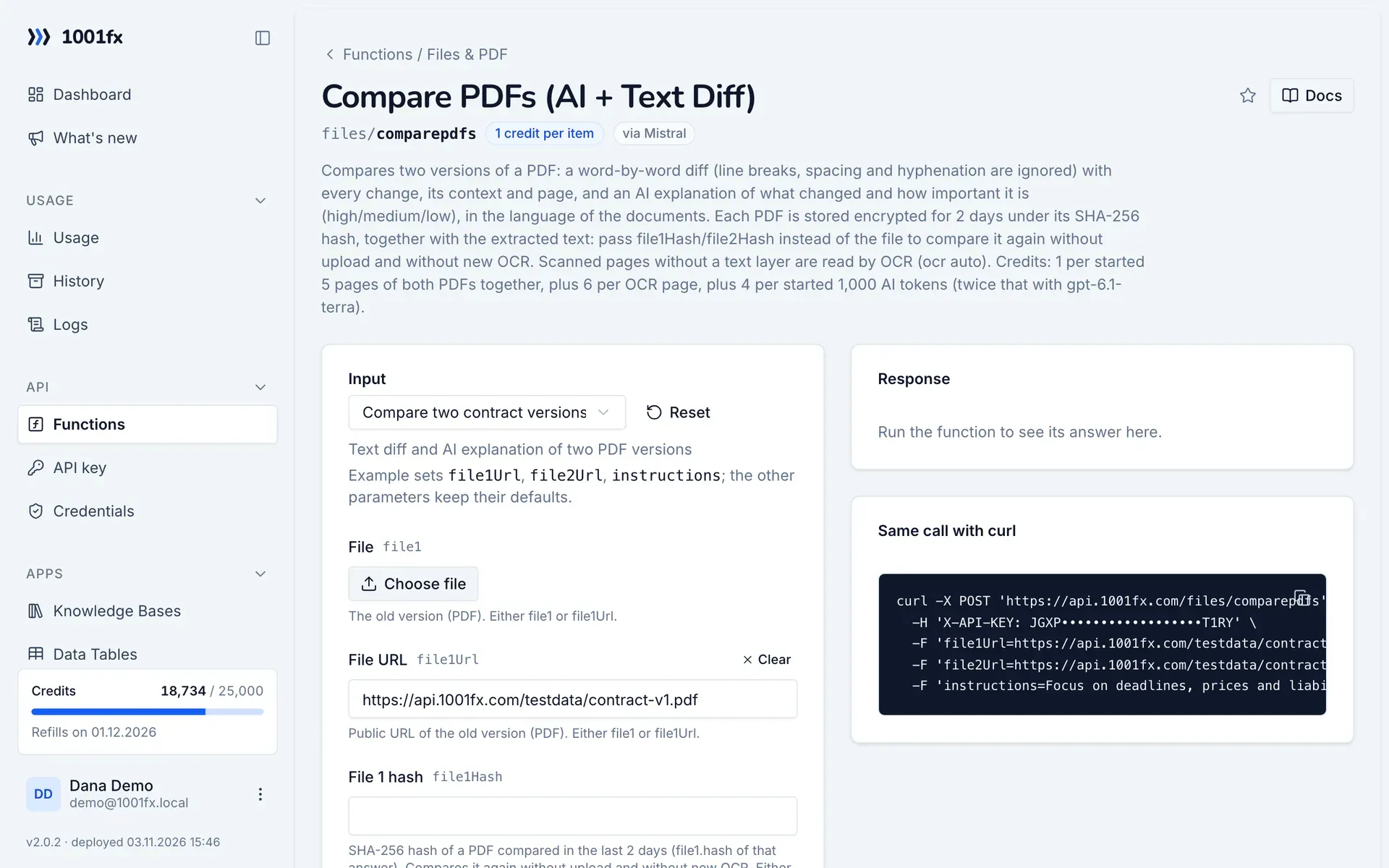
Without a scenario or workflow: run the function in your browser for a one-off task, or to try the fields before you build the automation.
- 1
Open the function
Log in to the 1001fx app and open Functions → Compare PDFs (AI + Text Diff).
- 2
Fill the fields
Fill the fields as described above. Files can be uploaded from your computer.
- 3
Run it
Click Run. The answer appears next to the form; files come as a download. Each run is charged like an API call.
- 4
Reuse the call
The same page shows the call as cURL command, ready for scripts and other tools.
In Make
- 1
Start the scenario
Start with the modules that deliver both versions, for example Gmail "Watch emails" with the contract the other side sent back, and Google Drive "Download a file" for the version you sent.
- 2
Add the 1001fx module
Add a module, search for 1001fx and pick “Compare PDFs (AI + Text Diff)”. Select your 1001fx connection or create one with your API key.
- 3
Fill the fields
Fill the fields as described above, mapped from the previous steps.
- 4
Use the result
The answer contains result.identical, result.summary with the AI summary, result.aiChanges with the rated changes and result.changes with every changed passage. Add a filter on result.identical and send result.summary to Slack or by email when the text changed.
Connecting 1001fx: 1001fx for Make.
In n8n
- 1
Start the workflow
Start with the node that delivers the new version, for example a Gmail Trigger with the contract the other side sent back, and a Google Drive node that downloads the version you sent.
- 2
Add the HTTP Request node
Add the HTTP Request node and send a POST request to https://api.1001fx.com/files/comparepdfs with the header X-API-KEY and your API key.
- 3
Fill the fields
Fill the fields as described above, mapped from the previous steps.
- 4
Use the result
The answer contains result.identical, result.summary with the AI summary, result.aiChanges with the rated changes and result.changes with every changed passage. Use an IF node on result.identical, and send result.summary to Slack or by email when the text changed.
How to set up the HTTP Request node: 1001fx for n8n.
Tips
- Both PDFs are stored for 2 days under their hash (result.file1.hash). Send file1Hash instead of the file to compare the same version again without upload and without new OCR.
- Scanned pages are read by OCR automatically (ocr auto) and cost 6 credits per page extra.
- Large PDFs take longer: send the call with the header x-fx-webhook so it runs in the background.
Frequently asked questions
- What does a comparison cost?
- 1 credit per started 5 pages of both PDFs together, plus 4 credits per started 1,000 AI tokens, plus 6 credits per OCR page. Without AI only the page price is charged.
- Are images and layout compared?
- No. PDF Compare compares the text. Line breaks, spacing and hyphenation are ignored, so only real changes show up.