- App
- Make
How to skip duplicates with data tables
To process every record only once in a Make scenario, keep the IDs you handled in a 1001fx data table. Before acting, datatables/rowexists checks whether the ID is already there; afterwards insertrows stores it. The table belongs to your 1001fx account, so you can also view, edit and import it as CSV in the 1001fx app.
The fields
The same in the 1001fx app and Make. rowexists costs 1 credit per call.
- table
- – The name of your data table, for example processed_orders. Create it once with createtable or in the app, with a column such as orderId.
- filters
- – One condition: column orderId, condition eq, value the ID from the previous step.
- match
- – all (default): every condition must match; any: one is enough.
All parameters and examples: rowexists reference.
Example
What you send to rowexists and what comes back – the same in every tool.
Check if rows exist in a data table
Needs an API key of an account (not a test key).
Input
{
  "table": "processed_orders",
  "filters": [
    {
      "column": "orderId",
      "condition": "eq",
      "value": "A-17"
    }
  ]
}Output · HTTP 200
{
  "statusCode": 200
}Show curl command
curl -X POST 'https://api.1001fx.com/datatables/rowexists' \
  -H 'X-API-KEY: YOURSECRETAPIKEY' \
  -H 'Content-Type: application/json' \
-d '{"table":"processed_orders","filters":[{"column":"orderId","condition":"eq","value":"A-17"}]}'In the 1001fx app
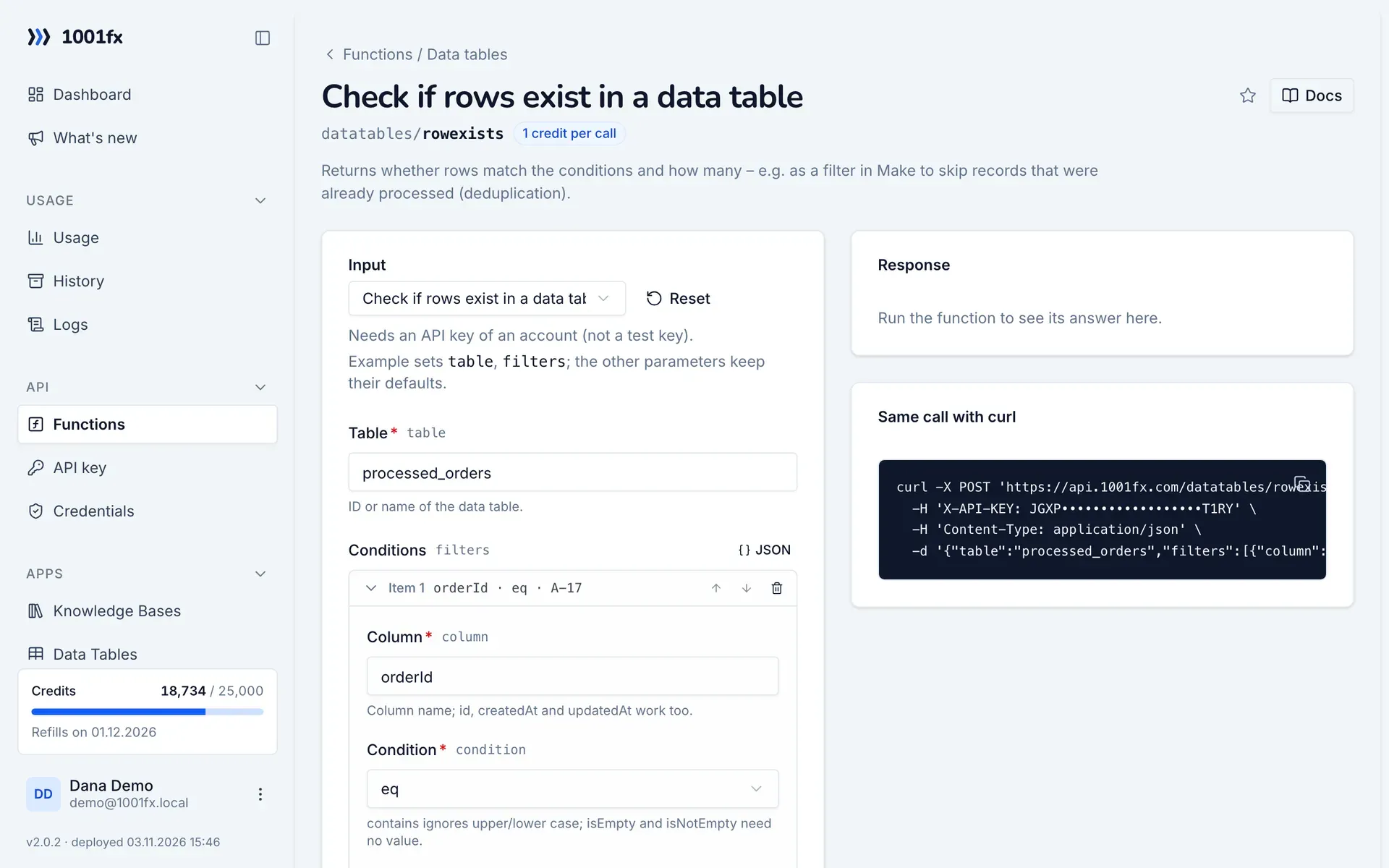
Without a scenario or workflow: run the function in your browser for a one-off task, or to try the fields before you build the automation.
- 1
Open the function
Log in to the 1001fx app and open Functions → Check if rows exist in a data table.
- 2
Fill the fields
Fill the fields as described above. Files can be uploaded from your computer.
- 3
Run it
Click Run. The answer appears next to the form; files come as a download. Each run is charged like an API call.
- 4
Reuse the call
The same page shows the call as cURL command, ready for scripts and other tools.
In Make
- 1
Start the scenario
Start with the module that delivers new records, for example Webhooks "Custom webhook" with incoming orders or Google Sheets "Watch new rows".
- 2
Add the 1001fx module
Add a module, search for 1001fx and pick “Check if rows exist in a data table”. Select your 1001fx connection or create one with your API key.
- 3
Fill the fields
Fill the fields as described above, mapped from the previous steps.
- 4
Use the result
The answer contains result.exists and result.count. Add a filter after the module that only continues when result.exists is false. At the end of the scenario, add the 1001fx module "Insert rows into a data table" with the same table and the ID in rows, so the next run skips the record.
Connecting 1001fx: 1001fx for Make.
Tips
- Turn on sequential processing in the scenario settings when several runs can write the same table: the last write wins.
- upsertrow updates or inserts in one call, for example to keep a status or a counter per record.
- Remove rows you no longer need with deleterows; dryRun shows the affected rows first.
Frequently asked questions
- Can I see and edit the table?
- Yes. Open Data Tables in the 1001fx app to view and edit rows and to import or export CSV.
- What does it cost?
- 1 credit per call, independent of the number of rows.
- How many rows fit into a table?
- Up to 1,000 rows and 1 MB per table. The number of tables depends on your plan.