- App
- Make
- n8n
How to format dates
To convert a date into another format, send it to the 1001fx function formatdatetime with the target format, for example DD.MM.YYYY HH:mm – from Make, n8n or the 1001fx app. With formatsToTest you list the formats the input may have, which helps with ambiguous dates such as 14/08/22.
The fields
The same in the 1001fx app, Make and n8n. formatdatetime costs 1 credit per call.
- date
- – The date from the previous step, for example 14/08/22.
- format
- – The output format, for example DD.MM.YYYY HH:mm or YYYY-MM-DD.
- formatsToTest
- – Optional list of input formats to try, for example DD/MM/YY and MM/DD/YY.
All parameters and examples: formatdatetime reference.
Example
What you send to formatdatetime and what comes back – the same in every tool.
Format DD.MM.YY
Converts the date to DD.MM.YY
Input
{
  "date": "14/08/22",
  "format": "DD.MM.YYYY HH:mm",
  "formatsToTest": [
    "MM/DD/YY",
    "DD/MM/YY",
    "YY/MM/DD",
    "YY.MM.DD HH:mm"
  ]
}Output · HTTP 200
{
  "result": "14.08.2022 00:00"
}Show curl command
curl -X POST 'https://api.1001fx.com/datetime/formatdatetime' \
  -H 'X-API-KEY: YOURSECRETAPIKEY' \
  -H 'Content-Type: application/json' \
-d '{"date":"14/08/22","format":"DD.MM.YYYY HH:mm","formatsToTest":["MM/DD/YY","DD/MM/YY","YY/MM/DD","YY.MM.DD HH:mm"]}'In the 1001fx app
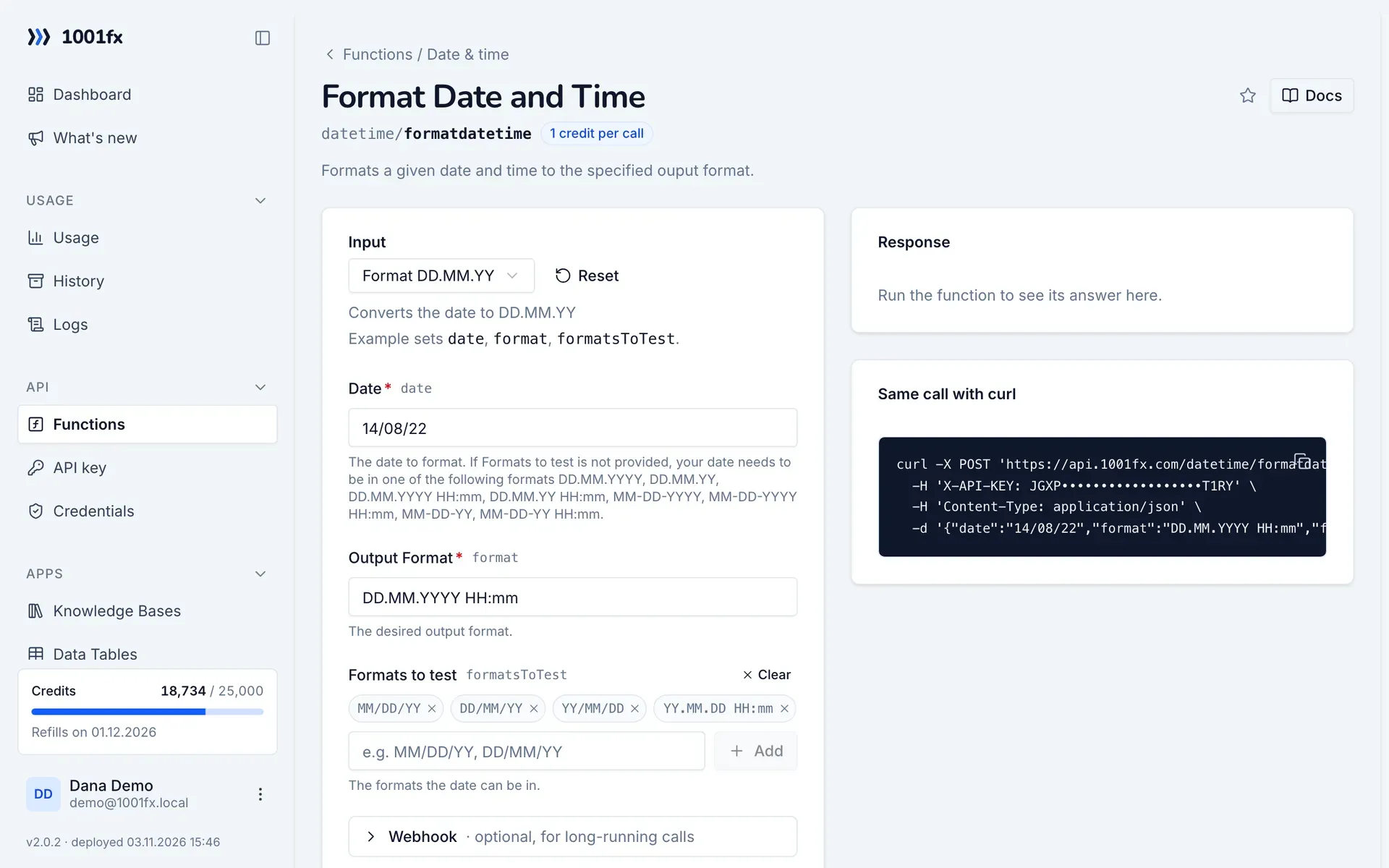
Without a scenario or workflow: run the function in your browser for a one-off task, or to try the fields before you build the automation.
- 1
Open the function
Log in to the 1001fx app and open Functions → Format Date and Time.
- 2
Fill the fields
Fill the fields as described above. Files can be uploaded from your computer.
- 3
Run it
Click Run. The answer appears next to the form; files come as a download. Each run is charged like an API call.
- 4
Reuse the call
The same page shows the call as cURL command, ready for scripts and other tools.
In Make
- 1
Start the scenario
Start with the module that delivers the date, for example Google Sheets "Watch new rows" or a webhook.
- 2
Add the HTTP – Make a request module
Add the HTTP – Make a request module and send a POST request to https://api.1001fx.com/datetime/formatdatetime with the header X-API-KEY and your API key.
- 3
Fill the fields
Fill the fields as described above, mapped from the previous steps.
- 4
Use the result
The answer is JSON with result, for example 14.08.2022 00:00. Map result into the next module.
How to set up the HTTP – Make a request module: 1001fx for Make.
In n8n
- 1
Start the workflow
Start with the node that delivers the date, for example a Google Sheets Trigger node for new rows or a Webhook node.
- 2
Add the 1001fx node
Add a node, search for 1001fx and pick “Format Date and Time”. Select your 1001fx credential or create one with your API key.
- 3
Fill the fields
Fill the fields as described above, mapped from the previous steps.
- 4
Use the result
The answer is JSON with result, for example 14.08.2022 00:00. Use result in the next node with an expression.
Connecting 1001fx: 1001fx for n8n.
Tips
- Use converttimezone to move a date into another time zone.
- Use addtodate to add or subtract days, months or years before formatting.
Frequently asked questions
- Which format tokens can I use?
- Tokens such as DD for the day, MM for the month, YYYY for the year, HH for the hour and mm for the minute, for example DD.MM.YYYY HH:mm.
- My dates come in different formats. What can I do?
- List the possible input formats in formatsToTest. Without it the date has to be in one of the formats named on the function page, such as DD.MM.YYYY.