- App
- Make
- n8n
How to check if a date is a public holiday
To check whether a date is a public holiday, call the 1001fx function isholiday with the date, the country and optionally the state – from Make, n8n or the 1001fx app. The answer says whether it is a holiday and, if so, its name and type, so a filter or an IF node can skip or reroute the run.
The fields
The same in the 1001fx app, Make and n8n. isholiday costs 1 credit per call.
- date
- – The date, for example 25.12.2026. For today: {{formatDate(now; "DD.MM.YYYY")}} in Make, {{ $now.toFormat("dd.MM.yyyy") }} in n8n.
- country
- – Two-letter country code such as DE, AT or US, or the full country name without spaces.
- state
- – Optional state code, for example BY for Bavaria, for holidays that apply only in some states.
All parameters and examples: isholiday reference.
Example
What you send to isholiday and what comes back – the same in every tool.
Christmas in Hesse
25.12.2020 for country DE, state HE: a holiday.
Input
{
  "date": "25.12.2020",
  "country": "DE",
  "state": "HE"
}Output · HTTP 200
{
  "result": {
    "date": "2020-12-25 00:00:00",
    "start": "2020-12-24T23:00:00.000Z",
    "end": "2020-12-25T23:00:00.000Z",
    "name": "1. Weihnachtstag",
    "type": "public",
    "isHoliday": true
  }
}Show curl command
curl -X POST 'https://api.1001fx.com/datetime/isholiday' \
  -H 'X-API-KEY: YOURSECRETAPIKEY' \
  -H 'Content-Type: application/json' \
-d '{"date":"25.12.2020","country":"DE","state":"HE"}'In the 1001fx app
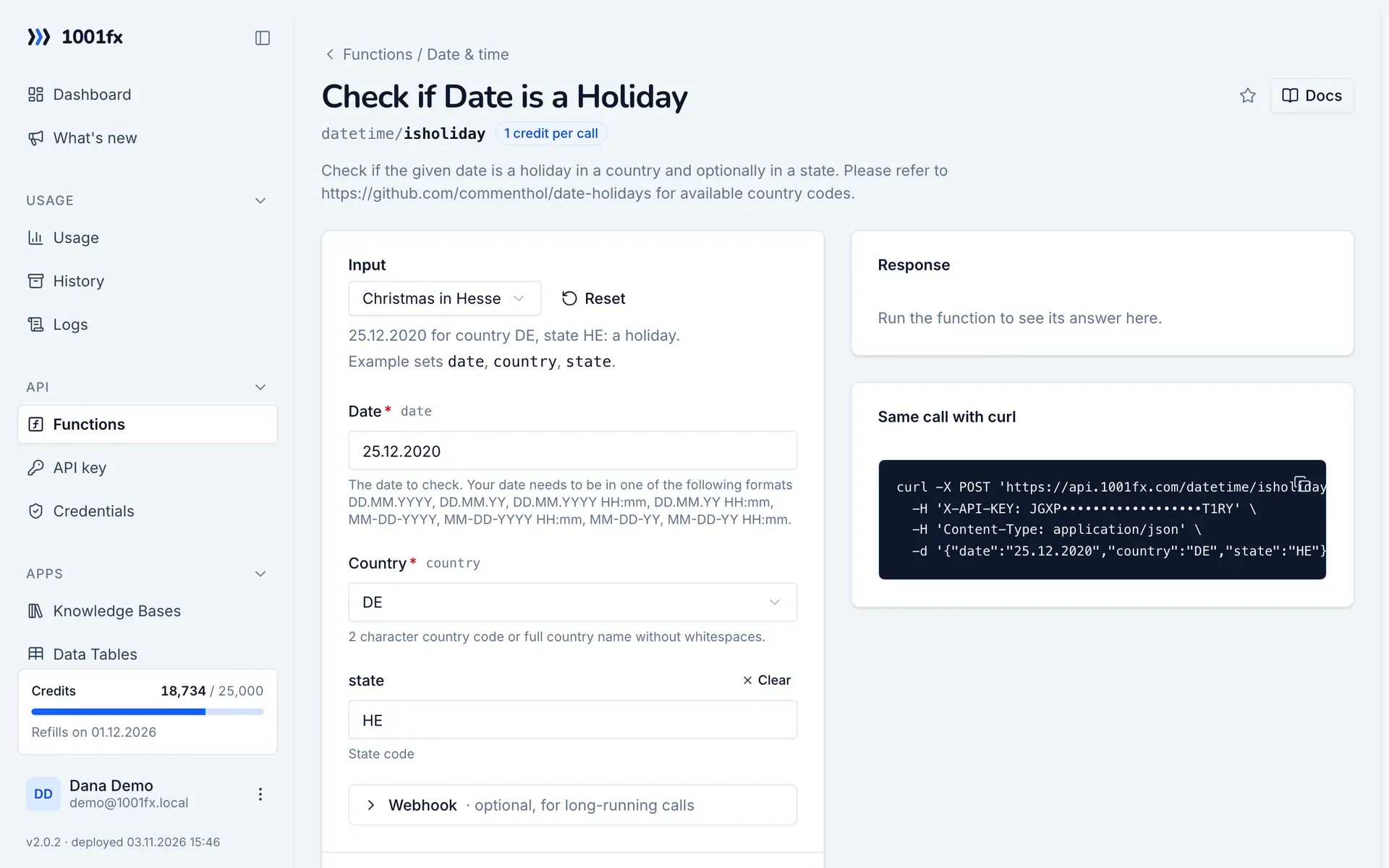
Without a scenario or workflow: run the function in your browser for a one-off task, or to try the fields before you build the automation.
- 1
Open the function
Log in to the 1001fx app and open Functions → Check if Date is a Holiday.
- 2
Fill the fields
Fill the fields as described above. Files can be uploaded from your computer.
- 3
Run it
Click Run. The answer appears next to the form; files come as a download. Each run is charged like an API call.
- 4
Reuse the call
The same page shows the call as cURL command, ready for scripts and other tools.
In Make
- 1
Start the scenario
Start with a scenario scheduled to run every morning, or with the module that delivers the date you want to check.
- 2
Add the HTTP – Make a request module
Add the HTTP – Make a request module and send a POST request to https://api.1001fx.com/datetime/isholiday with the header X-API-KEY and your API key.
- 3
Fill the fields
Fill the fields as described above, mapped from the previous steps.
- 4
Use the result
The answer contains result.isHoliday (true or false) and, for a holiday, result.name and result.type. Add a filter on result.isHoliday to stop the scenario, or a Router to handle both cases.
How to set up the HTTP – Make a request module: 1001fx for Make.
In n8n
- 1
Start the workflow
Start with a Schedule Trigger node that runs every morning, or with the node that delivers the date you want to check.
- 2
Add the 1001fx node
Add a node, search for 1001fx and pick “Check if Date is a Holiday”. Select your 1001fx credential or create one with your API key.
- 3
Fill the fields
Fill the fields as described above, mapped from the previous steps.
- 4
Use the result
The answer contains result.isHoliday (true or false) and, for a holiday, result.name and result.type. Use an IF node on result.isHoliday to stop or reroute the workflow.
Connecting 1001fx: 1001fx for n8n.
Tips
- Regional holidays need the state: 6 January is a holiday in Bavaria (BY), but not in every German state.
- Use isworkingday to skip weekends and holidays with one call.
Frequently asked questions
- Which countries are supported?
- The countries of the open source library date-holidays. Pass a two-letter code or the full country name; the function page links the list.
- Does it know regional holidays?
- Yes. Pass the state code in state, for example HE for Hesse or BY for Bavaria.