App
Humanizer: make AI text read like a person wrote it
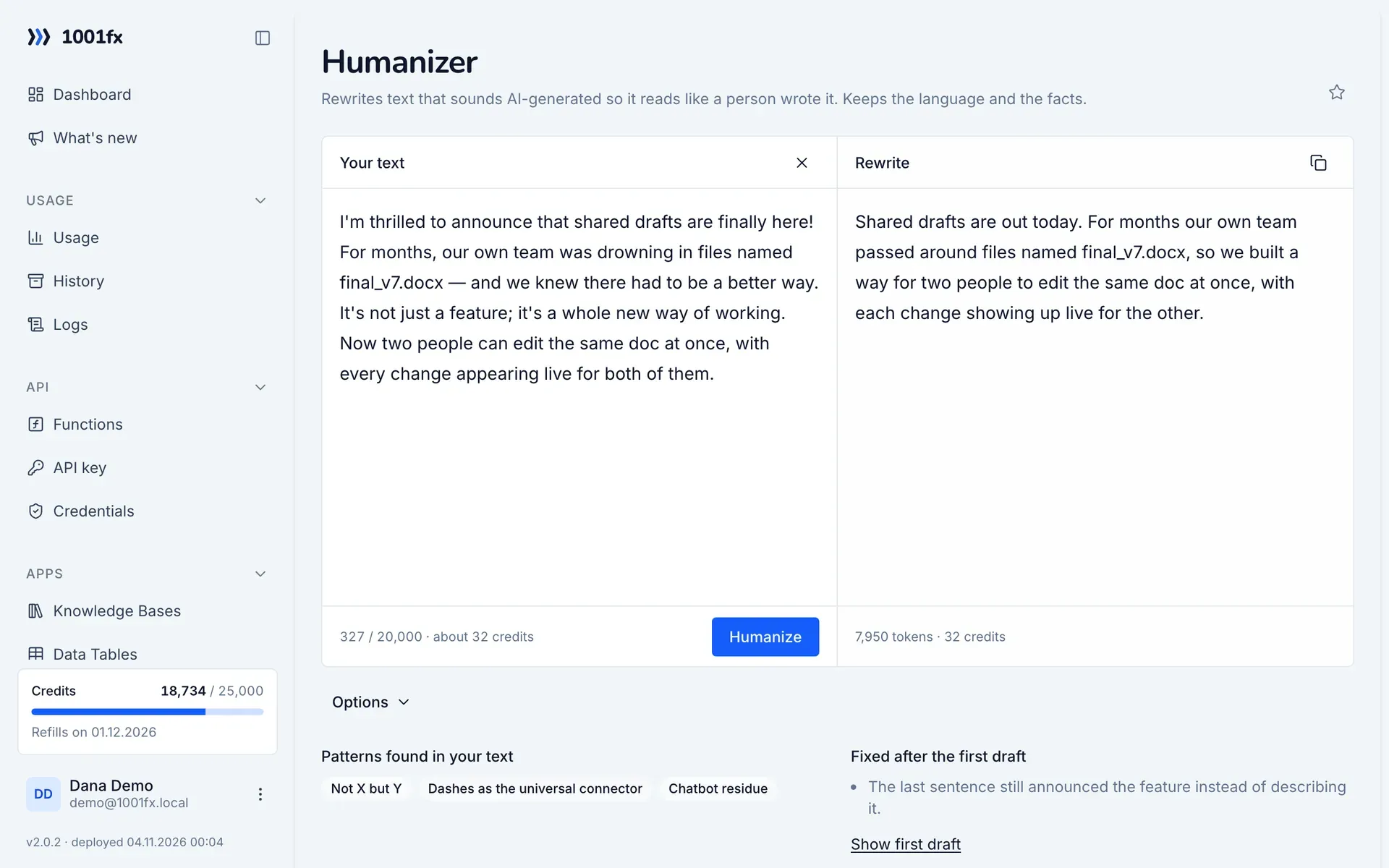
Humanizer rewrites text that sounds AI-generated so it reads like a person wrote it. It checks 26 patterns from Wikipedia's "Signs of AI writing", such as not-X-but-Y contrasts, one-line closers and inflated claims, and keeps the language and the facts of your text. It is written for human readers: getting past AI detectors is not a goal.
Key facts
- Input
- Text up to 20,000 characters in any language; optionally a writing sample and the conversation the text replies to
- Result
- The rewrite, the patterns found, the first draft and what was fixed after it
- Stays unchanged
- Code, commands, URLs, link targets, data and placeholders such as {{name}}
- Costs
- 4 credits per started 1,000 tokens. The rules take about 7,400 tokens per call, so a short text costs about 32 credits; gpt-6.1-terra costs twice as much
- Privacy
- Sent to Azure OpenAI in the EU. The app does not store your text
- In the app
- Your text on the left, the rewrite on the right, with copy button and credit estimate
- Available via
- REST API (https://api.1001fx.com) with your API key – from Make, n8n, scripts and AI agents
What you can do with it
- Clean up AI drafts of blog posts, newsletters and announcements before they go out
- Rewrite generated product descriptions and support replies in your own voice
- Remove chatbot leftovers such as "I hope this helps" in an automated Make or n8n scenario
- Shorten a reply so it leads with the decision instead of repeating what the reader knows
How it works
- 1
Open Humanizer in the app, or call ai/humanizer with your text in the field text.
- 2
Optionally add a sample of your own writing, so the rewrite follows your style.
- 3
Read the rewrite next to your text and copy it, or use the JSON in your workflow.
Functions
Each function has its own page with all parameters, examples and a ready-to-copy curl command.
| Function | Endpoint | Credits |
|---|---|---|
| Humanizer – Rewrite AI-sounding Text | POST /ai/humanizer | 4 credits per 1,000 tokens (minimum 4) |
Example
A call of https://api.1001fx.com/ai/humanizer. Replace YOURSECRETAPIKEY with your API key.
curl -X POST 'https://api.1001fx.com/ai/humanizer' \
  -H 'X-API-KEY: YOURSECRETAPIKEY' \
  -H 'Content-Type: application/json' \
-d '{"text":"I'\''m thrilled to announce that shared drafts are finally here! For months, our own team was drowning in files named final_v7.docx — and we knew there had to be a better way. It'\''s not just a feature; it'\''s a whole new way of working. Now two people can edit the same doc at once."}'Frequently asked questions
- Does Humanizer get text past AI detectors?
- That is not its goal, and detectors may still flag the result. It edits for human readers: it removes the habits that make text sound generated.
- Can it change my facts?
- Its rules forbid adding a fact, name, number, date, quote or citation that is not in your text, and the model checks its draft against them. AI can still make mistakes, so read the rewrite before you publish it.
- Which languages does it support?
- The rewrite stays in the language of your text and is never translated. The patterns are written in English, and the model applies them to the equivalent constructions in other languages.
About 1001fx
1001fx is a function API for no-code automation and AI agents, operated by efec AG in Germany. One API key gives access to more than 158 functions for files, PDFs, images, data, dates and AI. Learn how 1001fx works.