App
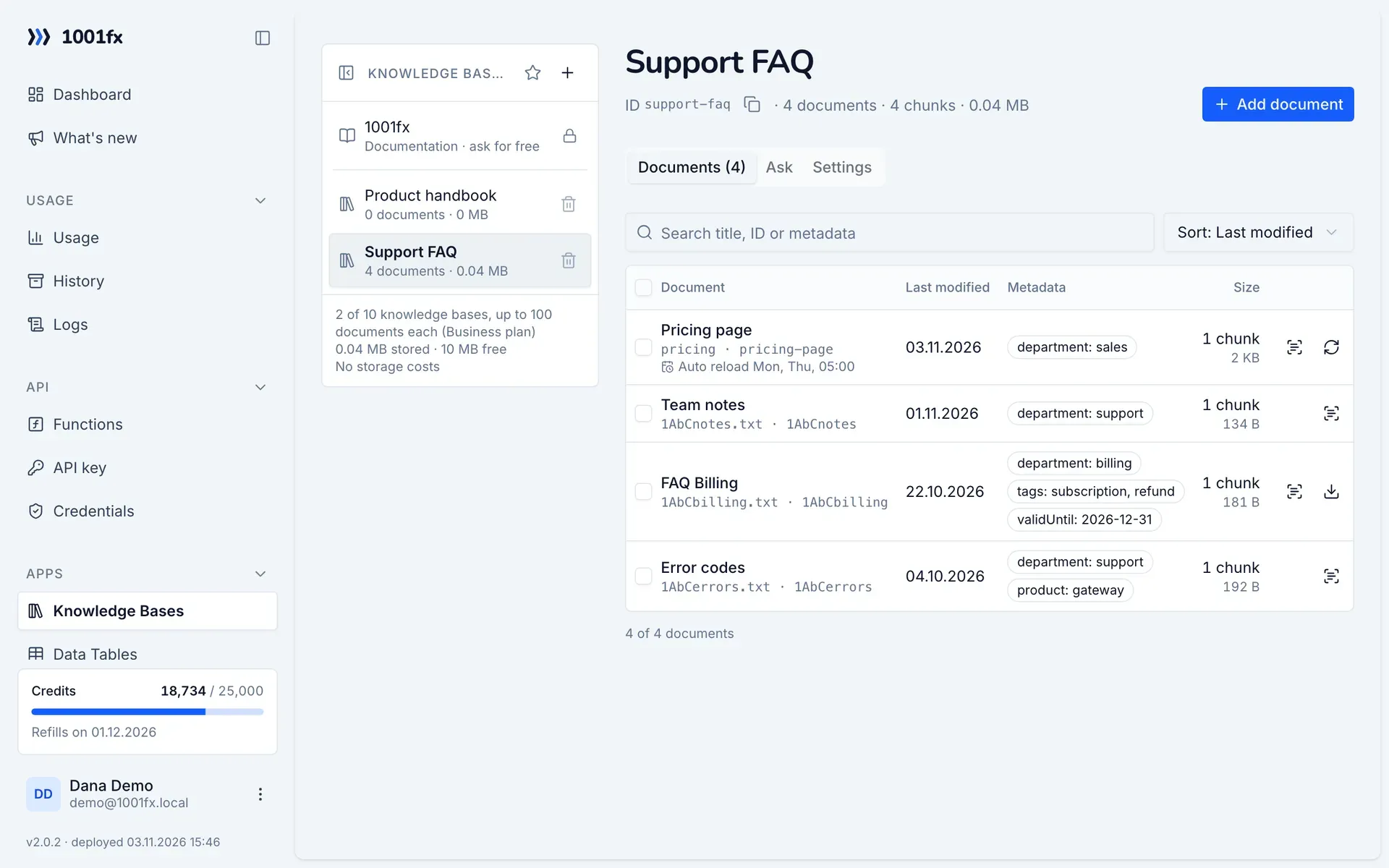
Knowledge bases: answers from your documents
A 1001fx knowledge base stores your documents and answers questions about them with AI, including the passages it used as sources (RAG, retrieval-augmented generation). You add documents in the app or with the rag functions from Make, n8n or your code. Storage, search and the AI answer run at 1001fx in one call, so you need no vector database and no AI account of your own.
Try it: ask the 1001fx knowledge base
The chat on the right runs on a 1001fx knowledge base filled with our own documentation – the same search and AI answers with sources your knowledge base gets.
Key facts
- Documents
- PDF, Word, PowerPoint, Excel, OpenDocument, HTML, text, Markdown and CSV – as upload, URL or text, up to 50 MB; scans with OCR
- Answers
- AI answer only from your documents, with sources, optional citations like [1] and filters on metadata
- Search
- Hybrid search by meaning and by exact words and codes, also without AI answer
- Knowledge bases
- Per account by plan: Free 1, Starter 3, Business 10, Enterprise 25
- Documents per knowledge base
- Free 5, Starter 50, Business 100, Enterprise 200
- Costs
- Adding: 1 credit per 1,000 tokens read, unchanged content is free. Asking: 4 credits per started 1,000 tokens (8 with gpt-6.1-terra). Search: 1 credit.
- Storage
- 1 credit per MB and month, 10 MB free per account; 1,000 passages are about 10 MB
- Data protection
- Stored on servers in Germany; embeddings and answers by Azure OpenAI in the EU, no training on your data
- In Make
- Modules in the 1001fx app for Make with a drop-down for your knowledge bases; in n8n and other tools as HTTP request
- Available via
- REST API (https://api.1001fx.com) with your API key – from Make, n8n, scripts and AI agents
What you can do with it
- Answer support questions from a chat, form or e-mail with your FAQ, manuals and policies
- Keep a Google Drive or SharePoint folder in sync: add new files, update changed ones, delete removed ones
- Give an AI agent the knowledge of your company as one tool call
- Search contracts, offers or tickets by meaning and by exact numbers and codes
- Feed the found passages into your own AI step with your own prompt
How it works
- 1
Create a knowledge base in the app, or call rag/adddocument with a new name – the knowledge base is created on first use.
- 2
Add documents as file, URL or text with a stable documentId, for example the Drive file ID, and optional metadata.
- 3
Ask with rag/ask: 1001fx finds the best passages and the AI answers only from them, with sources.
- 4
Keep the documents current with rag/updatedocument and rag/deletedocument, or let the app reload URL documents on a schedule.
Functions
Each function has its own page with all parameters, examples and a ready-to-copy curl command.
| Function | Endpoint | Credits |
|---|---|---|
| RAG – Add Document to Knowledge Base | POST /rag/adddocument | 1 credit per 1,000 tokens (minimum 1) |
| RAG – Update Document in Knowledge Base | POST /rag/updatedocument | 1 credit per 1,000 tokens (minimum 1) |
| RAG – Ask Knowledge Base (AI Answer with Sources) | POST /rag/ask | 4 credits per 1,000 tokens (minimum 4) |
| RAG – Semantic Search in Knowledge Base | POST /rag/search | 1 credit per call |
| RAG – Get Document | POST /rag/getdocument | 0 credits per call |
| RAG – List Documents | POST /rag/listdocuments | 0 credits per call |
| RAG – List Knowledge Bases | POST /rag/listknowledgebases | 0 credits per call |
| RAG – Delete Document from Knowledge Base | POST /rag/deletedocument | 0 credits per call |
| RAG – Delete Documents by Filter | POST /rag/deletedocuments | 0 credits per call |
Example
A call of https://api.1001fx.com/rag/ask. Replace YOURSECRETAPIKEY with your API key.
curl -X POST 'https://api.1001fx.com/rag/ask' \
  -H 'X-API-KEY: YOURSECRETAPIKEY' \
  -H 'Content-Type: application/json' \
-d '{"knowledgeBase":"Support FAQ","question":"How do I cancel my subscription?"}'Frequently asked questions
- What is RAG?
- Retrieval-augmented generation: before the AI answers, the passages that fit the question are searched in your documents and given to the AI. The answer is based on your documents instead of the general knowledge of the model, and you see the sources.
- Do I need a vector database or an OpenAI account?
- No. 1001fx stores the documents, creates the embeddings, searches and writes the answer. You only need your 1001fx API key.
- What happens when the answer is not in my documents?
- The AI says so instead of guessing. Text in documents that tries to give the AI instructions is not followed and is marked in the sources.
- Does adding the same document again cost credits twice?
- No. The same documentId replaces the document, and unchanged content is not read again and costs 0 credits.
- Can I try it before I build a workflow?
- Yes. Ask the 1001fx knowledge base on this page – it runs on the same technology. In the app every knowledge base has an Ask tab for testing.
About 1001fx
1001fx is a function API for no-code automation and AI agents, operated by efec AG in Germany. One API key gives access to more than 154 functions for files, PDFs, images, data, dates and AI. Learn how 1001fx works.