Skip to content
Browse all functions

RAG – Update Document in Knowledge Base

rag/updatedocument

updatedocument (RAG – Update Document in Knowledge Base) is a 1001fx API function in the group Knowledge bases (RAG): POST https://api.1001fx.com/rag/updatedocument, 1 credit per 1,000 tokens (minimum 1). It works as a ready-made module in Make or as a plain HTTP call.

Part of the app Knowledge Bases – Store documents and get AI answers with sources – no vector database, no AI account.

Changes a document of a knowledge base (404 if it does not exist). With file, fileUrl or text the content is read again (1 credit per 1,000 tokens, 0 if unchanged; a larger or smaller document changes the storage until the end of the month, result.storageCredits); without, only title, sourceUrl, lastModified, author and metadata change (0 credits). Metadata are merged by default (null removes a key); metadataMode replace sets exactly the given ones. A new folder only moves the document (0 credits). For a doc, send the edited Markdown as markdown and the contentHash you read as baseHash: if someone changed the doc in the meantime the call fails with 409.

  • This service is provided by an external service provider: Microsoft Azure OpenAI, Mistral (with useOcr). The data of the call is sent to the provider. More about service providers

Try it in the 1001fx app

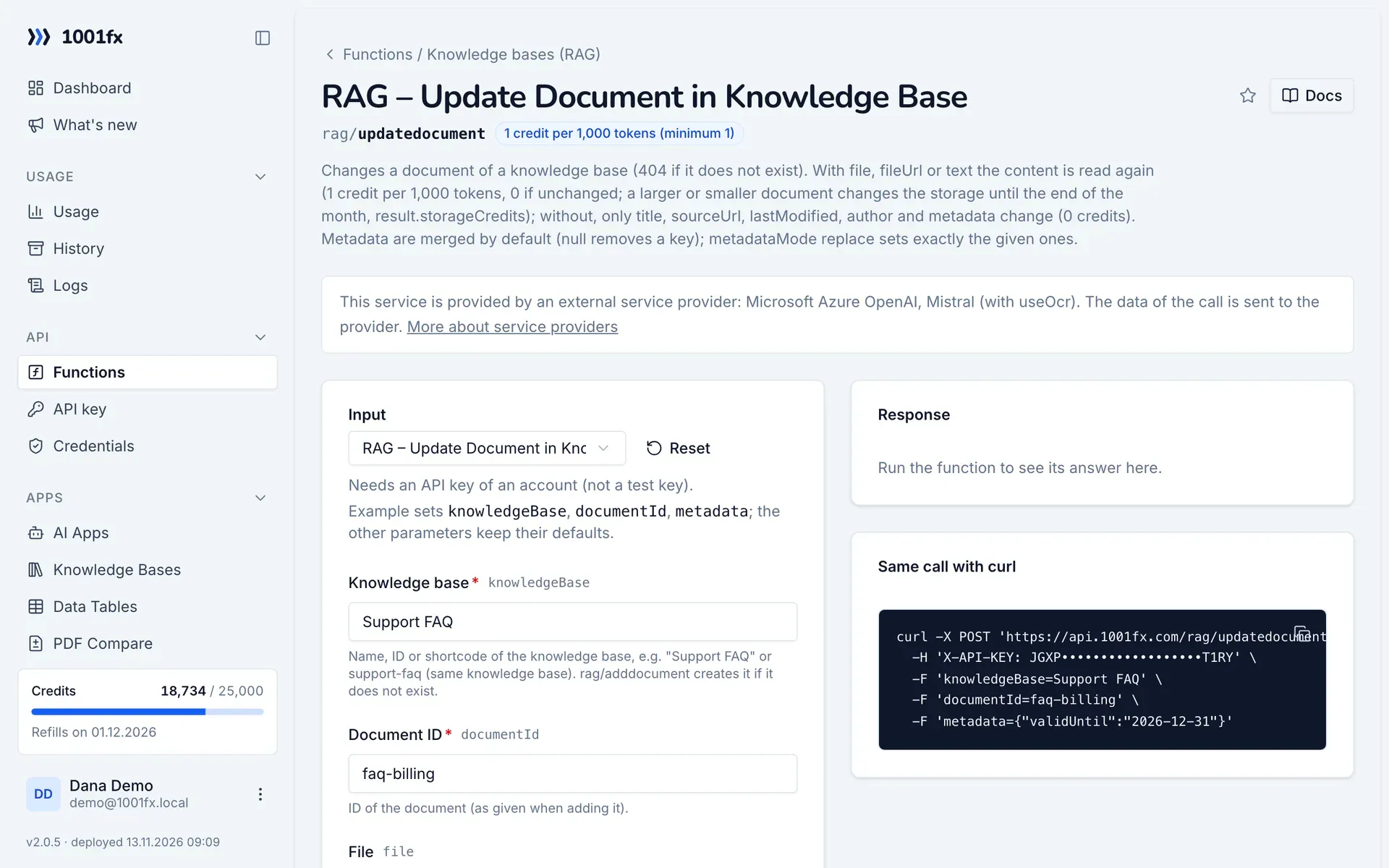
Run updatedocument in your browser with your API key – fill the form, click Run and get the answer or the file.

updatedocument in the 1001fx app: the form with example values
RAG – Update Document in Knowledge Base in the 1001fx app

Endpoint

POSThttps://api.1001fx.com/rag/updatedocument
Header
X-API-KEY: YOURSECRETAPIKEY How to
Content type
multipart/form-data

Parameters

  • knowledgeBasestringrequired

    Name, ID or shortcode of the knowledge base, e.g. "Support FAQ" or support-faq (same knowledge base). rag/adddocument creates it if it does not exist.

    Example:
    Support FAQ
  • documentIdstringrequired

    ID of the document (as given when adding it).

    Example:
    1AbCdriveFileId
  • filefileoptional

    The new version of the document. Either file or fileUrl.

  • fileUrlstringoptional

    Public URL of the document. Either file, fileUrl or text.

    Example:
    https://api.1001fx.com/testdata/sample.pdf
  • textstringoptional

    The content as text (or Markdown). Either file, fileUrl, text or markdown.

  • markdownstringoptional

    The content as Markdown that is kept and can be edited in the 1001fx app (a doc) – rag/getdocument returns it as markdown. Mermaid, math, tables and callouts are shown in the app. Either file, fileUrl, text or markdown.

  • folderstringoptional

    Folder of the document, e.g. "guides/setup". Path with slashes, up to 5 levels, "" = top level.

    Example:
    guides/setup
  • titlestringoptional

    Shown in the sources of rag/ask. Default: the title of the file or its name.

  • sourceUrlstringoptional

    Link to the original, e.g. in Google Drive – returned with the sources.

  • lastModifiedstringoptional

    ISO 8601, e.g. modifiedTime of the Drive file. Default: from the file (Last-Modified header, PDF/Office properties) or now.

  • authorstringoptional

    Default: from the file properties.

  • useOcrbooleanoptional

    For scans and images: reads the document with OCR (6 credits per page on top, at most 8 pages).

    Default:
    false
  • metadataanyoptional

    Own key-value pairs; merged with the stored ones (null removes a key). Object {"department": "support", "tags": ["billing"]} or array [{"key": "year", "value": "2026", "type": "number"}] (type text, number, boolean or date). At most 50 keys and 8 KB.

  • metadataModeenumoptional

    merge (default) or replace.

    Values:
    merge
    replace
    Default:
    merge
  • baseHashstringoptional

    contentHash of the version you edited (from rag/getdocument): if the document was changed since, the call fails with 409 instead of overwriting it. Empty overwrites.

Examples

RAG – Update Document in Knowledge Base

Needs an API key of an account (not a test key).

Input

Expects a json body
{
  "knowledgeBase": "Support FAQ",
  "documentId": "faq-billing",
  "metadata": {
    "validUntil": "2026-12-31"
  }
}

Output · HTTP 200

Response
{
  "statusCode": 200
}
Show curl command
curl -X POST 'https://api.1001fx.com/rag/updatedocument' \
  -H 'X-API-KEY: YOURSECRETAPIKEY'

Use cases

Try updatedocument now

Run it in your browser or create a free account and get 100 credits every month.

Changelog

  • 1.0.002.11.2026created
Ask 1001fx