Skip to content
Browse all functions

Execute Javascript Code

code/executejavascript

executejavascript (Execute Javascript Code) is a 1001fx API function in the group Code: POST https://api.1001fx.com/code/executejavascript, 5 credits per item. It works as a ready-made module in Make and n8n or as a plain HTTP call.

5 credits per itemHTTP APIn8nMake

Execute JavaScript code in a sandbox on our server. The following npm packages can be used: momentjs, cheerio, handlebars, ... (see https://1001fx.com for full list). Exceptions will be caught and returned. Strict is forced and imports are not allowed.

Use cases

  • Run a calculation or data transformation that your workflow tool has no module for
  • Parse HTML with cheerio or render a Handlebars or Mustache template
  • Validate data with zod, yup or joi before you send it to another system
  • Generate UUIDs or ULIDs for new records

Try it in the 1001fx app

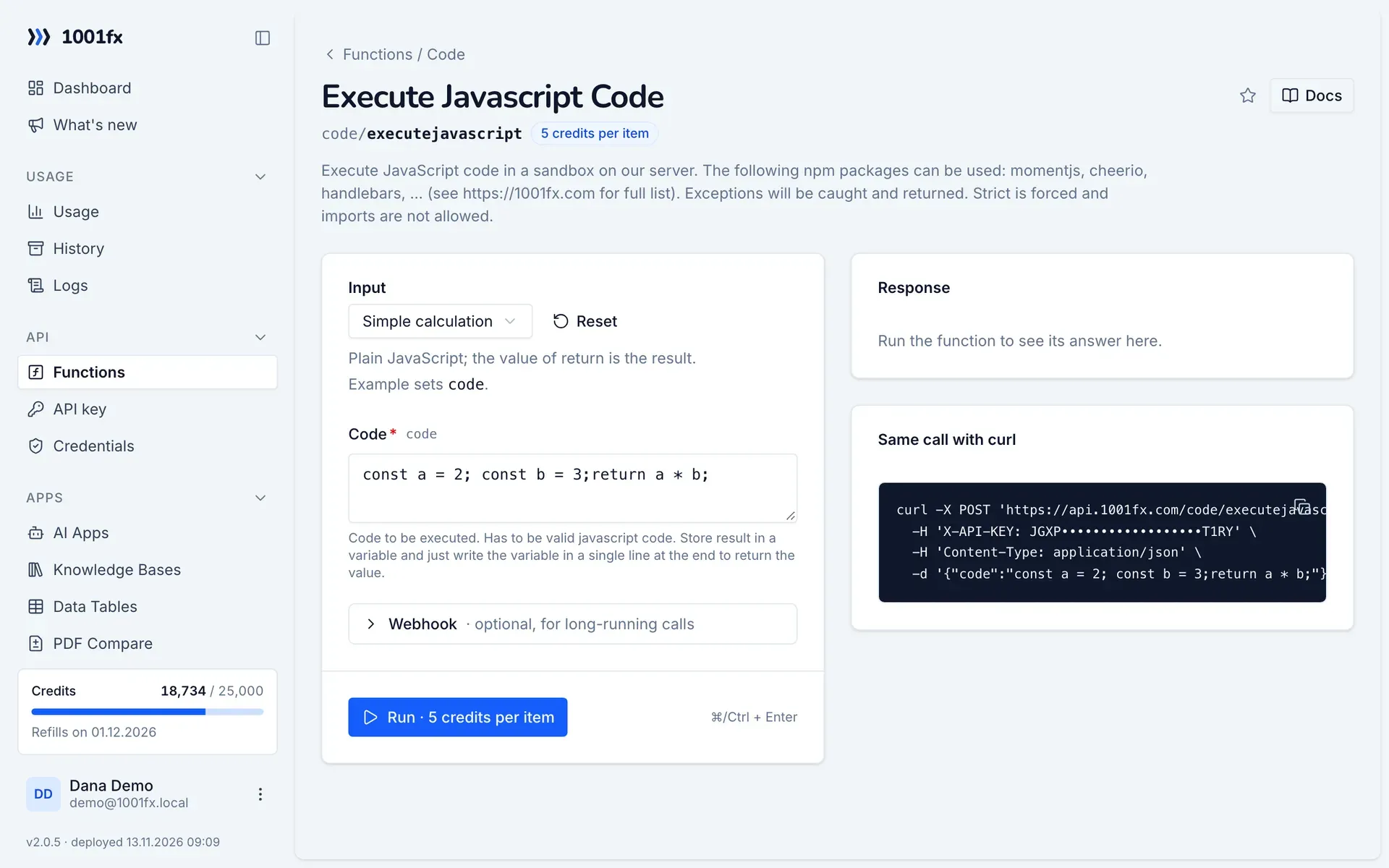
Run executejavascript in your browser with your API key – fill the form, click Run and get the answer or the file.

executejavascript in the 1001fx app: the form with example values
Execute Javascript Code in the 1001fx app

Endpoint

POSThttps://api.1001fx.com/code/executejavascript
Header
X-API-KEY: YOURSECRETAPIKEY How to
Content type
application/json

Parameters

  • codestringrequired

    Code to be executed. Has to be valid javascript code. Store result in a variable and just write the variable in a single line at the end to return the value.

    Example:
    const a = 2; const b = 3;return a * b;

Examples

Simple calculation

Plain JavaScript; the value of return is the result.

Input

Expects a json body
{
  "code": "const a = 2; const b = 3;return a * b;"
}

Output · HTTP 200

Response
{
  "result": 6
}
Show curl command
curl -X POST 'https://api.1001fx.com/code/executejavascript' \
  -H 'X-API-KEY: YOURSECRETAPIKEY' \
  -H 'Content-Type: application/json' \
  -d '{"code":"const a = 2; const b = 3;return a * b;"}'

Use axios

Loads a JSON file with axios.get and returns it.

Input

Expects a json body
{
  "code": "const res = await axios.get('https://api.1001fx.com/testdata/data.json');return res.data;"
}

Output · HTTP 200

Response
{
  "result": {
    "data": {
      "foundation": "Mozilla",
      "model": "box",
      "week": 45,
      "transport": "car",
      "month": 7,
      "car": "BMW"
    }
  }
}
Show curl command
curl -X POST 'https://api.1001fx.com/code/executejavascript' \
  -H 'X-API-KEY: YOURSECRETAPIKEY' \
  -H 'Content-Type: application/json' \
  -d '{"code":"const res = await axios.get('\''https://api.1001fx.com/testdata/data.json'\'');return res.data;"}'

Use cheerio

Parses HTML and reads the text of an element.

Input

Expects a json body
{
  "code": "const c = cheerio.load(\"<h2 class='title'>Hello world</h2>\");return c('h2.title').text()"
}

Output · HTTP 200

Response
{
  "result": "Hello world"
}
Show curl command
curl -X POST 'https://api.1001fx.com/code/executejavascript' \
  -H 'X-API-KEY: YOURSECRETAPIKEY' \
  -H 'Content-Type: application/json' \
  -d '{"code":"const c = cheerio.load(\"<h2 class='\''title'\''>Hello world</h2>\");return c('\''h2.title'\'').text()"}'

Use crypto-js

Encrypts a text with AES.

Input

Expects a json body
{
  "code": "return cryptojs.AES.encrypt('Hello World', 'My Encryption Secret').toString();"
}

Output · HTTP 200

Response
{
  "statusCode": 200
}
Show curl command
curl -X POST 'https://api.1001fx.com/code/executejavascript' \
  -H 'X-API-KEY: YOURSECRETAPIKEY' \
  -H 'Content-Type: application/json' \
  -d '{"code":"return cryptojs.AES.encrypt('\''Hello World'\'', '\''My Encryption Secret'\'').toString();"}'

Use handlebars

Renders a Handlebars template.

Input

Expects a json body
{
  "code": "const template = handlebars.compile('Hello <b>{{firstName}} {{lastName}}</b>'); return template({ firstName: '100fx', lastName: 'User' })"
}

Output · HTTP 200

Response
{
  "result": "Hello <b>100fx User</b>"
}
Show curl command
curl -X POST 'https://api.1001fx.com/code/executejavascript' \
  -H 'X-API-KEY: YOURSECRETAPIKEY' \
  -H 'Content-Type: application/json' \
  -d '{"code":"const template = handlebars.compile('\''Hello <b>{{firstName}} {{lastName}}</b>'\''); return template({ firstName: '\''100fx'\'', lastName: '\''User'\'' })"}'

Use joi

Validates an object with a joi schema.

Input

Expects a json body
{
  "code": "const schema = joi.object({firstName: joi.string().required(), lastName: joi.string().required()}); return schema.validate({firstName: '1001fx' })"
}

Output · HTTP 200

Response
{
  "result": {
    "value": {
      "firstName": "1001fx"
    },
    "error": {
      "_original": {
        "firstName": "1001fx"
      },
      "details": [
        {
          "message": "\"lastName\" is required",
          "path": [
            "lastName"
          ],
          "type": "any.required",
          "context": {
            "label": "lastName",
            "key": "lastName"
          }
        }
      ]
    }
  }
}
Show curl command
curl -X POST 'https://api.1001fx.com/code/executejavascript' \
  -H 'X-API-KEY: YOURSECRETAPIKEY' \
  -H 'Content-Type: application/json' \
  -d '{"code":"const schema = joi.object({firstName: joi.string().required(), lastName: joi.string().required()}); return schema.validate({firstName: '\''1001fx'\'' })"}'

Use lodash

Difference of two arrays with lodash.

Input

Expects a json body
{
  "code": "return lodash.difference([2, 1], [2, 3])"
}

Output · HTTP 200

Response
{
  "result": [
    1
  ]
}
Show curl command
curl -X POST 'https://api.1001fx.com/code/executejavascript' \
  -H 'X-API-KEY: YOURSECRETAPIKEY' \
  -H 'Content-Type: application/json' \
  -d '{"code":"return lodash.difference([2, 1], [2, 3])"}'

Use moment

Formats the current date with moment.

Input

Expects a json body
{
  "code": "const now = moment(); return now.format('DD.MM.YYYY HH:mm');"
}

Output · HTTP 200

Response
{
  "statusCode": 200
}
Show curl command
curl -X POST 'https://api.1001fx.com/code/executejavascript' \
  -H 'X-API-KEY: YOURSECRETAPIKEY' \
  -H 'Content-Type: application/json' \
  -d '{"code":"const now = moment(); return now.format('\''DD.MM.YYYY HH:mm'\'');"}'

Use moment-timezone

Current time in Los Angeles with moment-timezone.

Input

Expects a json body
{
  "code": "const now = momentTimezone().tz('America/Los_Angeles'); return now.format('DD.MM.YYYY HH:mm');"
}

Output · HTTP 200

Response
{
  "statusCode": 200
}
Show curl command
curl -X POST 'https://api.1001fx.com/code/executejavascript' \
  -H 'X-API-KEY: YOURSECRETAPIKEY' \
  -H 'Content-Type: application/json' \
  -d '{"code":"const now = momentTimezone().tz('\''America/Los_Angeles'\''); return now.format('\''DD.MM.YYYY HH:mm'\'');"}'

Use mustache

Renders a Mustache template.

Input

Expects a json body
{
  "code": "const view = { title: '1001fx User', calc: ()=> 'cool'}; return mustache.render('{{title}} is {{calc}}',view);"
}

Output · HTTP 200

Response
{
  "result": "1001fx User is cool"
}
Show curl command
curl -X POST 'https://api.1001fx.com/code/executejavascript' \
  -H 'X-API-KEY: YOURSECRETAPIKEY' \
  -H 'Content-Type: application/json' \
  -d '{"code":"const view = { title: '\''1001fx User'\'', calc: ()=> '\''cool'\''}; return mustache.render('\''{{title}} is {{calc}}'\'',view);"}'

Use fetch

Loads a JSON file with fetch and returns it.

Input

Expects a json body
{
  "code": "const res = await fetch('https://api.1001fx.com/testdata/data.json');return await res.json();"
}

Output · HTTP 200

Response
{
  "result": {
    "data": {
      "foundation": "Mozilla",
      "model": "box",
      "week": 45,
      "transport": "car",
      "month": 7,
      "car": "BMW"
    }
  }
}
Show curl command
curl -X POST 'https://api.1001fx.com/code/executejavascript' \
  -H 'X-API-KEY: YOURSECRETAPIKEY' \
  -H 'Content-Type: application/json' \
  -d '{"code":"const res = await fetch('\''https://api.1001fx.com/testdata/data.json'\'');return await res.json();"}'

Use uuid

Creates a random UUID v4.

Input

Expects a json body
{
  "code": "return uuid.v4();"
}

Output · HTTP 200

Response
{
  "statusCode": 200
}
Show curl command
curl -X POST 'https://api.1001fx.com/code/executejavascript' \
  -H 'X-API-KEY: YOURSECRETAPIKEY' \
  -H 'Content-Type: application/json' \
  -d '{"code":"return uuid.v4();"}'

Use ulid

Creates a ULID.

Input

Expects a json body
{
  "code": "return ulid.ulid();"
}

Output · HTTP 200

Response
{
  "statusCode": 200
}
Show curl command
curl -X POST 'https://api.1001fx.com/code/executejavascript' \
  -H 'X-API-KEY: YOURSECRETAPIKEY' \
  -H 'Content-Type: application/json' \
  -d '{"code":"return ulid.ulid();"}'

Use yup

Validates an object with a yup schema.

Input

Expects a json body
{
  "code": "const schema = yup.object().shape({ firstName: yup.string().required(), lastName: yup.string().required()}); return await schema.validate({ firstName: '1001fx', lastName: 'User'});"
}

Output · HTTP 200

Response
{
  "result": {
    "firstName": "1001fx",
    "lastName": "User"
  }
}
Show curl command
curl -X POST 'https://api.1001fx.com/code/executejavascript' \
  -H 'X-API-KEY: YOURSECRETAPIKEY' \
  -H 'Content-Type: application/json' \
  -d '{"code":"const schema = yup.object().shape({ firstName: yup.string().required(), lastName: yup.string().required()}); return await schema.validate({ firstName: '\''1001fx'\'', lastName: '\''User'\''});"}'

Use zod

Validates an object with a zod schema.

Input

Expects a json body
{
  "code": "const schema = zod.z.object({ firstName: zod.z.string(), lastName: zod.z.string() }); return schema.parse({ firstName:'1001fx', lastName: 'User'});"
}

Output · HTTP 200

Response
{
  "result": {
    "firstName": "1001fx",
    "lastName": "User"
  }
}
Show curl command
curl -X POST 'https://api.1001fx.com/code/executejavascript' \
  -H 'X-API-KEY: YOURSECRETAPIKEY' \
  -H 'Content-Type: application/json' \
  -d '{"code":"const schema = zod.z.object({ firstName: zod.z.string(), lastName: zod.z.string() }); return schema.parse({ firstName:'\''1001fx'\'', lastName: '\''User'\''});"}'

Use underscore

Intersection of three arrays with underscore.

Input

Expects a json body
{
  "code": "return underscore.intersection([1, 2, 3], [101, 2, 1, 10], [2, 1]);"
}

Output · HTTP 200

Response
{
  "result": [
    1,
    2
  ]
}
Show curl command
curl -X POST 'https://api.1001fx.com/code/executejavascript' \
  -H 'X-API-KEY: YOURSECRETAPIKEY' \
  -H 'Content-Type: application/json' \
  -d '{"code":"return underscore.intersection([1, 2, 3], [101, 2, 1, 10], [2, 1]);"}'

Frequently asked questions

How do I return a value?
Store the result in a variable and write only the variable name in the last line of your code. Its value is returned as result.
Which libraries can I use?
Among others moment, moment-timezone, cheerio, handlebars, mustache, lodash, underscore, axios, fetch, crypto-js, uuid, ulid, joi, yup and zod. Imports are not allowed, the libraries are already available.
What happens if my code throws an error?
The code runs in a sandbox on the 1001fx servers in strict mode. Exceptions are caught and returned in the answer, so your workflow can react to them.

Use cases

Try executejavascript now

Run it in your browser or create a free account and get 100 credits every month.

Changelog

  • 1.0.014.03.2023created
Ask 1001fx