- App
- Make
- n8n
- MCP
How to run JavaScript code
To run your own JavaScript in a scenario or workflow, send the code to the 1001fx function executejavascript – from Make, n8n or the 1001fx app. The code runs in a sandbox on the 1001fx server, the value after return is the result, and packages such as lodash, moment, cheerio, axios and handlebars are ready to use without imports.
The fields
The same in the 1001fx app, Make, n8n and AI assistants. executejavascript costs 5 credits per item.
- code
- – Your JavaScript, with values from previous steps mapped into it, for example const total = {{price}} * {{quantity}}; return total; – the value after return is the result.
All parameters and examples: executejavascript reference.
Example
What you send to executejavascript and what comes back – the same in every tool.
Simple calculation
Plain JavaScript; the value of return is the result.
Input
{
  "code": "const a = 2; const b = 3;return a * b;"
}Output · HTTP 200
{
  "result": 6
}Show curl command
curl -X POST 'https://api.1001fx.com/code/executejavascript' \
  -H 'X-API-KEY: YOURSECRETAPIKEY' \
  -H 'Content-Type: application/json' \
-d '{"code":"const a = 2; const b = 3;return a * b;"}'In the 1001fx app
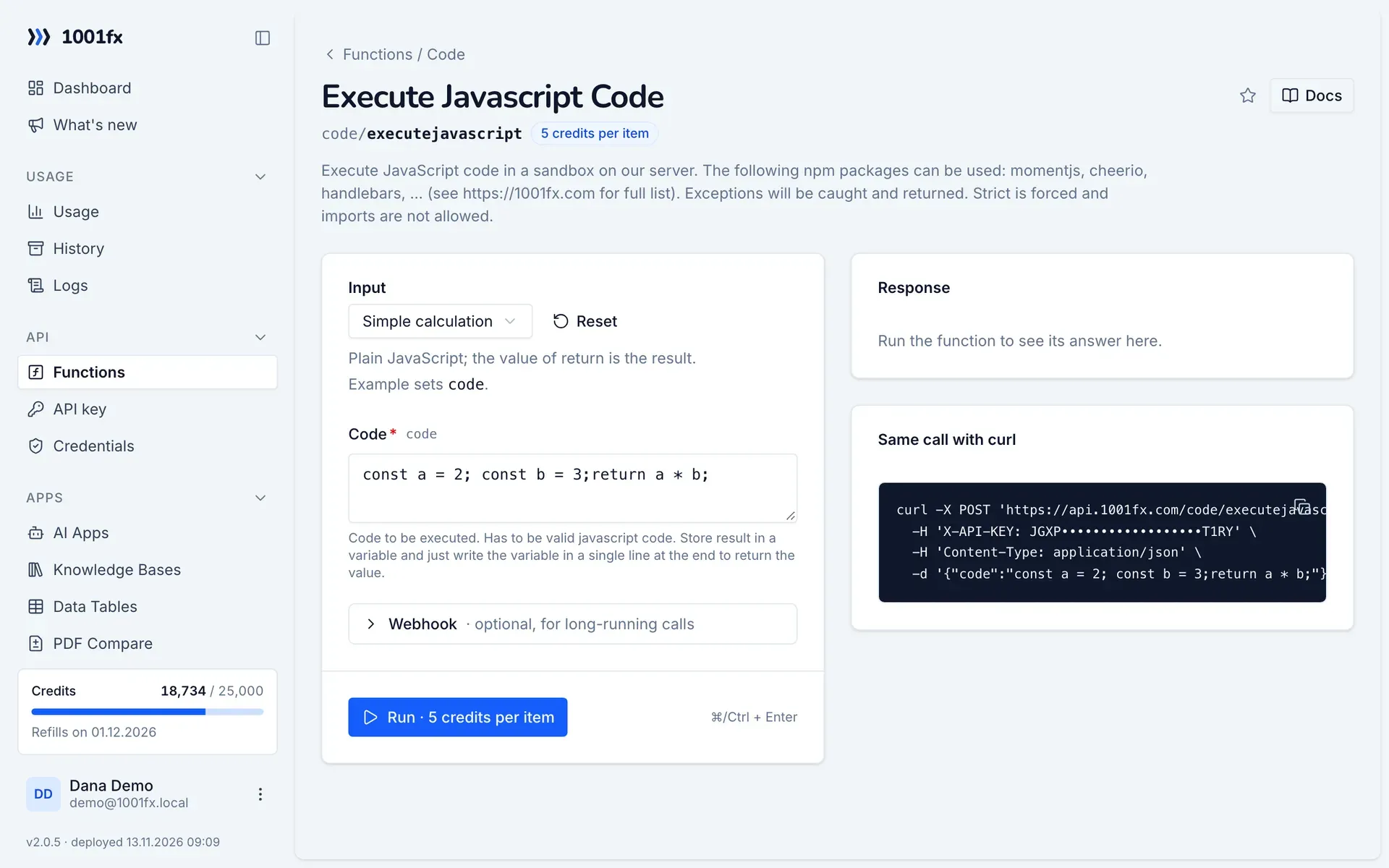
Without a scenario or workflow: run the function in your browser for a one-off task, or to try the fields before you build the automation.
- 1
Open the function
Log in to the 1001fx app and open Functions → Execute Javascript Code.
- 2
Fill the fields
Fill the fields as described above. Files can be uploaded from your computer.
- 3
Run it
Click Run. The answer appears next to the form; files come as a download. Each run is charged like an API call.
- 4
Reuse the call
The same page shows the call as cURL command, ready for scripts and other tools.
In Make
- 1
Start the scenario
Start with the module that delivers the data, for example Google Sheets "Watch new rows" or Webhooks "Custom webhook".
- 2
Add the 1001fx module
Add a module, search for 1001fx and pick “Execute Javascript Code”. Select your 1001fx connection or create one with your API key.
- 3
Fill the fields
Fill the fields as described above, mapped from the previous steps.
- 4
Use the result
The module returns result with the value of your return statement – a number, a text or a whole object. Map result into the next module, for example Google Sheets "Update a row".
Connecting 1001fx: 1001fx for Make.
In n8n
- 1
Start the workflow
Start with the node that delivers the data, for example a Google Sheets Trigger or a Webhook node.
- 2
Add the 1001fx node
Add a node, search for 1001fx and pick “Execute Javascript Code”. Select your 1001fx credential or create one with your API key.
- 3
Fill the fields
Fill the fields as described above, mapped from the previous steps.
- 4
Use the result
The node returns result with the value of your return statement. Use it in the next node, for example a Google Sheets node that updates the row.
Connecting 1001fx: 1001fx for n8n.
With an AI assistant (MCP)
Without building anything: connect your assistant to 1001fx once and ask for the result in your own words.
- 1
Connect your assistant
Add the 1001fx MCP server to Claude, Cursor or another MCP client and log in to 1001fx.
- 2
Ask for the result
Describe what you need and mention 1001fx, for example: "Use 1001fx to run JavaScript code". The assistant finds code/executejavascript and fills its fields.
- 3
Get the answer
Pass files as links. File results come back as a temporary download link. Each run is charged like an API call.
Tips
- Available without import: axios, cheerio, crypto-js, handlebars, joi, lodash, moment, moment-timezone, mustache, fetch, uuid, ulid, yup, zod and underscore.
- Errors in your code are caught and returned, so the scenario shows what went wrong instead of stopping without a message.
- Strict mode is forced and imports are not allowed: use the packages above under their names, for example lodash.difference or moment().
Frequently asked questions
- What does a call cost?
- 5 credits per item.
- Can I load data from a URL in the code?
- Yes, with axios or fetch, for example const res = await axios.get(url); return res.data;
- Which npm packages can I use?
- axios, cheerio, crypto-js, handlebars, joi, lodash, moment, moment-timezone, mustache, fetch, uuid, ulid, yup, zod and underscore.